GoomY
Leave ReciMe and import your recipes into GoomY
Ready to leave ReciMe? Your recipes do not have to stay stuck there. GoomY pulls in your cookbooks, recipes, links and steps, then files them into folders.
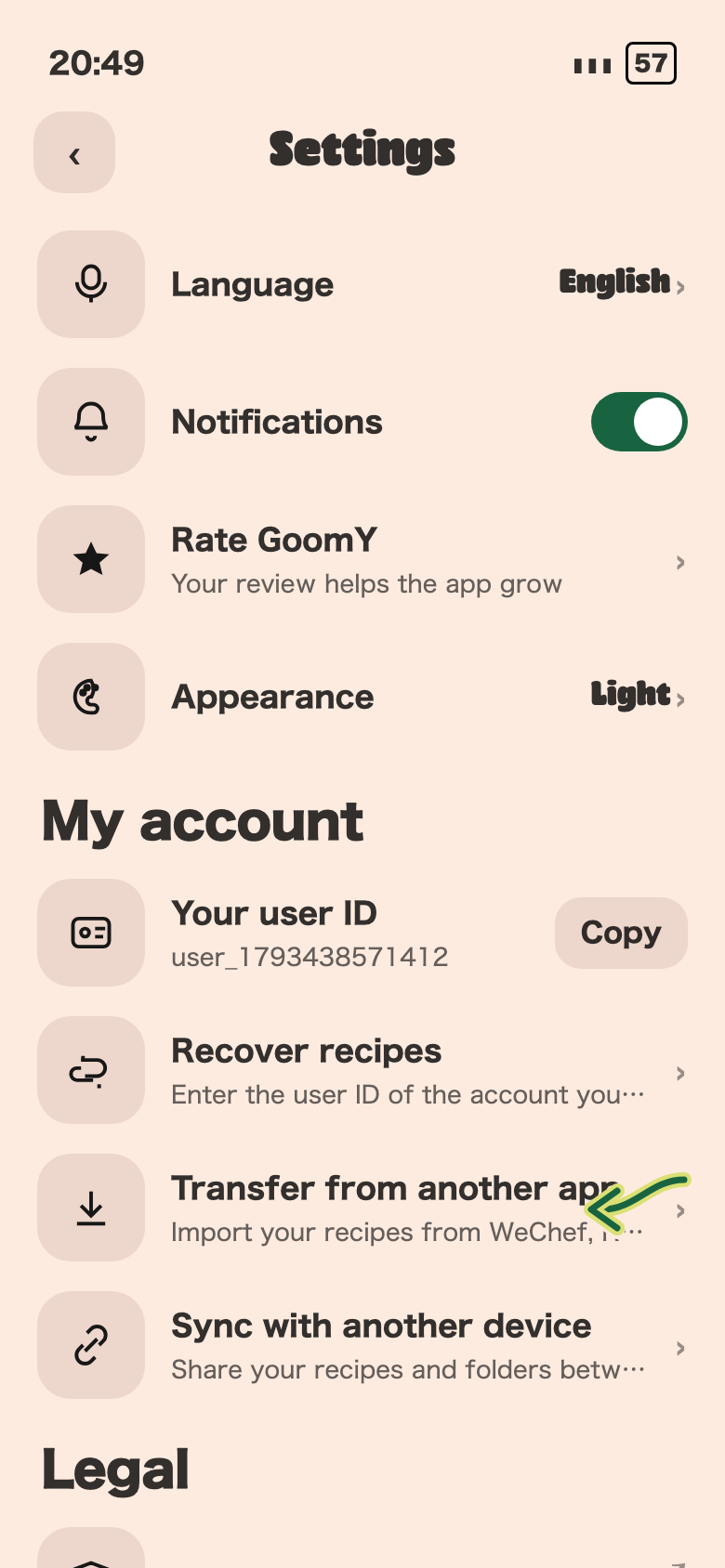
In GoomY open Settings, then Transfer from another app, then ReciMe. You sign in on ReciMe's own page. You never type that password into a GoomY form.

- Download GoomY. The app is free.
- Open Settings. The arrow marks Transfer from another app.
- Choose ReciMe.
- Sign in to ReciMe (Apple, Google or email), then tap “I'm logged in, continue”.
- Check the number of recipes and cookbooks.
- Tap Import into GoomY. Your folders are recreated.
Empty links saved in ReciMe are skipped. Only recipes that actually have content are imported.
FAQ
How do I leave ReciMe without losing my recipes?
Open GoomY, go to Settings, Transfer from another app, choose ReciMe and sign in. GoomY imports the recipes that have content.
Is GoomY a free ReciMe alternative?
Downloading GoomY is free. The ReciMe transfer happens inside the app, so you do not retype every recipe.
Do I give GoomY my ReciMe password?
No. You sign in on ReciMe, then tap “I'm logged in, continue”.
Are ReciMe cookbooks imported?
Yes. GoomY recreates your folders and files the imported recipes into them.